User Setup


When SMS Pro is started for the first time, the setup screen will be displayed.
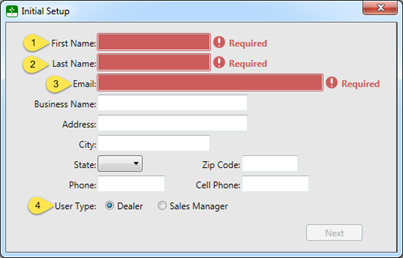
The first name, last name and email address are required in order to setup and register SMS Pro the first time it is used. The fields are shown as Required.
This determines how the sales hierarchy is maintained and at what level the reports are summarized. If you are unsure of which to select, leave the Dealer option selected.
Important Note: This cannot be changed without removing the all information from SMS Pro.
The remaining fields are not required and can be changed later by editing the properties of the user that is being setup.