A shipment transaction consists of the following fields:
- Transaction Date - This is the date the transaction occurred, not necessarily the date the information was entered.
- Product - The product as setup in the product hierarchy. More information, review adding new shipments.
- Transaction Type - What type of transaction, transaction types are described in more detail below.
- Transaction Number - This is an optional field for reference only.
- Lot Number - This is optional, but if used, it is highly recommended that it is entered in every instance. Otherwise the field becomes unreliable. When lot numbers are entered for a shipment, they become available as options on an order when marking items delivered.
- Seeds / Pound - This is an optional field for reference only.
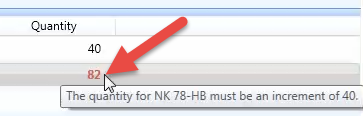
- Quantity - The number of units in the transaction, must be in an increment of the package type. Refer to validation section below for more details.

SMS Pro has the following transaction types:
- Stock Order - Product on order from a seed treater or seed company. Can also be used to estimate sales at the beginning of sales season.
- Received - Product received from a seed treater or seed company.
- Trans In - Product transferred from a different dealer.
- Trans Out - Product transferred to a different dealer.
- Returned - Dealer returns to a seed company.
Validation of package type unit sizes
If a package type has a unit size greater than 1, the quantity is validated. If it fails validation, a message is displayed with what increment the quantity needs to be.